Description
![]()
For only 49.95USD for a limited time. Promotion or discount/coupon code details (if applicable) will be present at the bottom of this post.
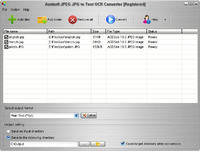
Aostsoft JPEG JPG to Text OCR Converter is an easy-to-use and flexible Image OCR converter. It can batch extract text from image JPEG JPG and convert into editable TXT document. Recognize characters in multiple languages, including: English, French, German, Italian, Spanish, Portuguese, Swedish, Romanian, Indonesian languages. Aostsoft JPEG JPG to Text OCR Converter can analyze and recognize the text contents in JPEG JPG image files.
Promotion Status:
No promo code is available for this product.
Platforms (if applicable):
Windows 2000, Windows 7, Windows 8, Windows Vista, Windows XP
Aostsoft JPEG JPG to Text OCR Converter is an easy-to-use and flexible Image OCR converter. It can batch extract text from image JPEG JPG and convert into editable TXT document. Recognize characters in multiple languages, including: English, French, German, Italian, Spanish, Portuguese, Swedish, Romanian, Indonesian languages. Aostsoft JPEG JPG to Text OCR Converter can analyze and recognize the text contents in JPEG JPG image files.
Key Features:
It provides user-friendly interface.
It doesn’t need third party’s program support.
Edit Scanned Image Documents like editing a text file.
Batch conversion of multiple JPEG JPG to editable Text TXT files.
Supports to extract text from JPEG JPG image to editable Text TXT files.
OCR your JPEG JPG image documents directly to Text TXT files.
Supports to choose the entire folder and sub-folder to convert.
Supports to add files, folder by dragging and dropping.
More…
Product Screenshot(s):
Vendor URL
Click here to go to the Vendor Website

